Affichage des articles dont le libellé est stm32. Afficher tous les articles

samedi 4 janvier 2014

STM32F4 discovery board adapter parts with Eagle

The STM32F4 discovery is a wonderful board but it is really not freindly when testing with all its ugly male connectors that it is impossible to put it in a lab board.

I don't know if anyone did this before, but I made a small adapter in eagle for this board so it can be easily integrated with other test or prototyping project or it can be simply used in a hole PCB board.

Download the part from here:


Bipolar Stepper Motor with STM32

Hi,
Stepper motors are very commun in many applications, they are widely used in printers scanners and many other equipements thanks to their easy control.


I really advice you to understand how bipolar stepper works before testing the following code.
Start from here !

 The following code is for controlling a bipolar stepper motor using STM32F4 discovery board.
I used a l293D for power interface between the stepper and the board like the following image:


And The I used this simple code to control my stepper in one direction with fixed speed using half step control.

void GPIOD_Initialize(){
 GPIO_InitTypeDef GPIOD_Stepper;
 RCC_AHB1PeriphClockCmd(RCC_AHB1Periph_GPIOD, ENABLE);
 
 GPIOD_Stepper.GPIO_Mode = GPIO_Mode_OUT;
 GPIOD_Stepper.GPIO_OType = GPIO_OType_PP;
 GPIOD_Stepper.GPIO_Pin = GPIO_Pin_1|GPIO_Pin_3|GPIO_Pin_5|GPIO_Pin_7;
 GPIOD_Stepper.GPIO_PuPd = GPIO_PuPd_NOPULL;
 GPIOD_Stepper.GPIO_Speed = GPIO_Speed_50MHz;
 GPIO_Init(GPIOD,&GPIOD_Stepper);
}


int main(void)
{
GPIOD_Initialize();
        while(1){
  GPIO_Write(GPIOD,GPIO_Pin_1); 
  Delay(100);
  GPIO_Write(GPIOD,GPIO_Pin_1| GPIO_Pin_3); 
  Delay(100);
  GPIO_Write(GPIOD,GPIO_Pin_3);
  Delay(100);
  GPIO_Write(GPIOD,GPIO_Pin_5|GPIO_Pin_3); 
  Delay(100);
  GPIO_Write(GPIOD,GPIO_Pin_5);
  Delay(100);
  GPIO_Write(GPIOD,GPIO_Pin_5|GPIO_Pin_7);
  Delay(100);
  GPIO_Write(GPIOD,GPIO_Pin_7);
  Delay(100);
  GPIO_Write(GPIOD,GPIO_Pin_7|GPIO_Pin_1);
  Delay(100);
         }
}


jeudi 2 janvier 2014

Timer with STM32F4

Hello,
This time I'll give you a short tutorial about how to use timers with the STM32.
Timers are very useful when it comes to make a precise period of time independantly from your main loop execution.


The stm32F4 has many timers each one with a specific need. I'm just going to use the Timer 2 to make an interruption each 0.25 sec.
I use a C# program to calculate what values to put in the prescaler and the periode to get my required interruption time.
https://www.mediafire.com/?bq21q5qd7frcvba

The code has comments in it but if there is something that is not clear explained in the comments below, I'll be happy to answer.


void TIM2_IRQHandler(void){
 static short i = 0;
if (TIM_GetITStatus(TIM2, TIM_IT_Update) != RESET)
{
TIM_ClearITPendingBit(TIM2, TIM_IT_Update);
 GPIO_WriteBit(GPIOD,GPIO_Pin_13,i++);
GPIO_ToggleBits(GPIOD, GPIO_Pin_14);
}
}

void INTTIM_Config(void)
{
NVIC_InitTypeDef NVIC_InitStructure;
TIM_TimeBaseInitTypeDef TIM_TimeBaseStructure;
/* Enable the TIM2 gloabal Interrupt */
NVIC_InitStructure.NVIC_IRQChannel = TIM2_IRQn;
NVIC_InitStructure.NVIC_IRQChannelPreemptionPriority = 0;
NVIC_InitStructure.NVIC_IRQChannelSubPriority = 1;
NVIC_InitStructure.NVIC_IRQChannelCmd = ENABLE;
NVIC_Init(&NVIC_InitStructure);
 
/* TIM2 clock enable */
RCC_APB1PeriphClockCmd(RCC_APB1Periph_TIM2, ENABLE);
/* Time base configuration */

TIM_TimeBaseStructure.TIM_Period = 1000000 - 1; // 1 MHz down to 1 KHz (1 ms)
TIM_TimeBaseStructure.TIM_Prescaler = 43- 1; // 24 MHz Clock down to 1 MHz (adjust per your clock)
TIM_TimeBaseStructure.TIM_ClockDivision = 0;
TIM_TimeBaseStructure.TIM_CounterMode = TIM_CounterMode_Up;
TIM_TimeBaseInit(TIM2, &TIM_TimeBaseStructure);
/* TIM IT enable */
TIM_ITConfig(TIM2, TIM_IT_Update, ENABLE);
/* TIM2 enable counter */
TIM_Cmd(TIM2, ENABLE);
}

int main(void)
{

 STM_EVAL_LEDInit(LED3);
 STM_EVAL_LEDInit(LED4);
 STM_EVAL_LEDInit(LED5);
 STM_EVAL_LEDInit(LED6); 
 INTTIM_Config();
 while(1);
}

vendredi 20 septembre 2013

Controlling 2*16 LCD with STM32F4 discovery board

LCD can be a very useful part in any microcontroller based project. It helps to monitor variables and program status with simple texts or numbers.

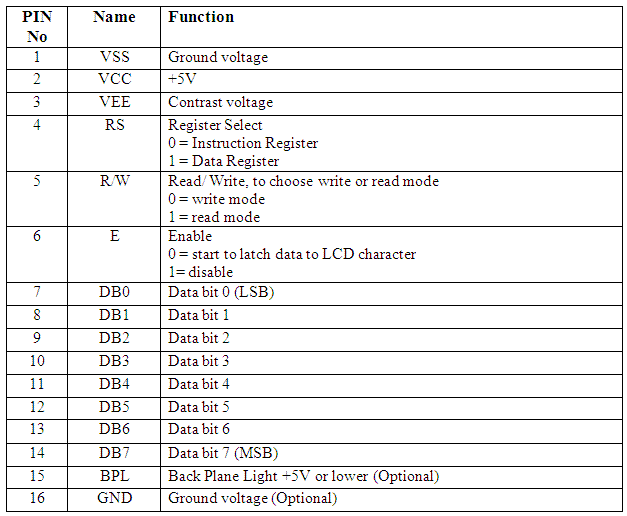
For this application I used a JHD 162 A alphanumeric LCD, like the picture above.
It hast 16 pins specified like this
VEE is used for contrast, so attache it to a potentiometer  and choose your best contrast. Or simply plug it to 5V if you need maximum contrast.
D0, D1, D2, D3 are grounded
I managed to find a library for STM32VL, so I needed to bring some changes to it before it works. This library works both for JHD 162A and the hd44780.

lcd_hd44780.h
//******************************************************************************
//    THE SOFTWARE INCLUDED IN THIS FILE IS FOR GUIDANCE ONLY.
//    AUTHOR SHALL NOT BE HELD LIABLE FOR ANY DIRECT, INDIRECT
//    OR CONSEQUENTIAL DAMAGES WITH RESPECT TO ANY CLAIMS ARISING
//    FROM USE OF THIS SOFTWARE.
//******************************************************************************

//##############################################################################
// lcd_hd44780.h
//##############################################################################

//****************************************************************************//
#include "main.h"


#define LCD_GPIO GPIOD
#define LCD_CLK_LINE RCC_AHB1Periph_GPIOD

#define LCD_D4 GPIO_Pin_1
#define LCD_D5 GPIO_Pin_3
#define LCD_D6 GPIO_Pin_5
#define LCD_D7 GPIO_Pin_7

#define LCD_RS GPIO_Pin_0
#define LCD_RW GPIO_Pin_2
#define LCD_EN GPIO_Pin_4
//******************************************************************************//


#define HD44780_CLEAR                                          0x01

#define HD44780_HOME                                           0x02

#define HD44780_ENTRY_MODE                                 0x04
        #define HD44780_EM_SHIFT_CURSOR          0
        #define HD44780_EM_SHIFT_DISPLAY         1
        #define HD44780_EM_DECREMENT               0
        #define HD44780_EM_INCREMENT               2

#define HD44780_DISPLAY_ONOFF                      0x08
        #define HD44780_DISPLAY_OFF                  0
        #define HD44780_DISPLAY_ON                         4
        #define HD44780_CURSOR_OFF                         0
        #define HD44780_CURSOR_ON                            2
        #define HD44780_CURSOR_NOBLINK     0
        #define HD44780_CURSOR_BLINK               1

#define HD44780_DISPLAY_CURSOR_SHIFT 0x10
        #define HD44780_SHIFT_CURSOR               0
        #define HD44780_SHIFT_DISPLAY              8
        #define HD44780_SHIFT_LEFT                         0
        #define HD44780_SHIFT_RIGHT                  4

#define HD44780_FUNCTION_SET                       0x20
        #define HD44780_FONT5x7                              0
        #define HD44780_FONT5x10                             4
        #define HD44780_ONE_LINE                             0
        #define HD44780_TWO_LINE                             8
        #define HD44780_4_BIT                                  0
        #define HD44780_8_BIT                                  16

#define HD44780_CGRAM_SET                                    0x40

#define HD44780_DDRAM_SET                                    0x80

//##############################################################
void lcd_init(void);
void lcd_cls(void);
void lcd_str(unsigned char * text);
void lcd_strxy(unsigned char * text, unsigned char x, unsigned char y);
void lcd_locate(unsigned char x, unsigned char y);
void lcd_int(int n);
void lcd_intxy(int n, unsigned char x, unsigned char y);

//###############################################################

void lcd_writedata(unsigned char dataToWrite);
void lcd_writecommand(unsigned char commandToWrite);
void lcd_writebinary(unsigned int var, unsigned char bitCount);
void lcd_addchar (unsigned char chrNum, unsigned char n, const unsigned char *p);


lcd_hd44780.c
#include "lcd_hd44780.h"
#include "stm32f4xx_gpio.h"
#include 
#include 
#include 
#include "stm32f4_discovery.h"

GPIO_InitTypeDef GPIO_InitStructure;

//-----------------------------------------------------------------------------
void lcd_writenibble(unsigned char nibbleToWrite)
{
  GPIO_WriteBit(LCD_GPIO, LCD_EN, Bit_SET);
  GPIO_WriteBit(LCD_GPIO, LCD_D4,(BitAction) (nibbleToWrite & 0x01));
  GPIO_WriteBit(LCD_GPIO, LCD_D5,(BitAction)(nibbleToWrite & 0x02));
  GPIO_WriteBit(LCD_GPIO, LCD_D6,(BitAction)(nibbleToWrite & 0x04));
  GPIO_WriteBit(LCD_GPIO, LCD_D7,(BitAction)(nibbleToWrite & 0x08));
  GPIO_WriteBit(LCD_GPIO, LCD_EN, Bit_RESET);
}


//-----------------------------------------------------------------------------
unsigned char LCD_ReadNibble(void)
{
  unsigned char tmp = 0;
  GPIO_WriteBit(LCD_GPIO, LCD_EN, Bit_SET);
  tmp |= (GPIO_ReadInputDataBit(LCD_GPIO, LCD_D4) << 0);
  tmp |= (GPIO_ReadInputDataBit(LCD_GPIO, LCD_D5) << 1);
  tmp |= (GPIO_ReadInputDataBit(LCD_GPIO, LCD_D6) << 2);
  tmp |= (GPIO_ReadInputDataBit(LCD_GPIO, LCD_D7) << 3);
  GPIO_WriteBit(LCD_GPIO, LCD_EN, Bit_RESET);
  return tmp;
}


//-----------------------------------------------------------------------------
unsigned char LCD_ReadStatus(void)
{
  unsigned char status = 0;

    GPIO_InitStructure.GPIO_Pin   =  LCD_D4 | LCD_D5 | LCD_D6 | LCD_D7;
    GPIO_InitStructure.GPIO_Mode  =  GPIO_Mode_IN;
    GPIO_Init(LCD_GPIO, &GPIO_InitStructure);

    GPIO_WriteBit(LCD_GPIO, LCD_RW, Bit_SET);
    GPIO_WriteBit(LCD_GPIO, LCD_RS, Bit_RESET);

    status |= (LCD_ReadNibble() << 4);
    status |= LCD_ReadNibble();

    GPIO_InitStructure.GPIO_Pin   =  LCD_D4 | LCD_D5 | LCD_D6 | LCD_D7;
    GPIO_InitStructure.GPIO_Mode = GPIO_Mode_OUT;
    GPIO_Init(LCD_GPIO, &GPIO_InitStructure);

  return status;
}


//-----------------------------------------------------------------------------
void lcd_writedata(unsigned char dataToWrite)
{
  GPIO_WriteBit(LCD_GPIO, LCD_RW, Bit_RESET);
  GPIO_WriteBit(LCD_GPIO, LCD_RS, Bit_SET);

  lcd_writenibble(dataToWrite >> 4);
  lcd_writenibble(dataToWrite & 0x0F);

  while(LCD_ReadStatus() & 0x80);
}


//-----------------------------------------------------------------------------
void lcd_writecommand(unsigned char commandToWrite)
{
  GPIO_WriteBit(LCD_GPIO, LCD_RW | LCD_RS, Bit_RESET);
  lcd_writenibble(commandToWrite >> 4);
  lcd_writenibble(commandToWrite & 0x0F);

  while(LCD_ReadStatus() & 0x80);
}


//-----------------------------------------------------------------------------
void lcd_str(unsigned char * text)
{
  while(*text)
    lcd_writedata(*text++);
}


//-----------------------------------------------------------------------------
void lcd_locate(unsigned char x, unsigned char y)
{
  lcd_writecommand(HD44780_DDRAM_SET | (x + (0x40 * y)));
}


//-----------------------------------------------------------------------------
void lcd_strxy(unsigned char * text, unsigned char x, unsigned char y)
{
  lcd_locate(x,y);
  while(*text)
    lcd_writedata(*text++);
}


//-----------------------------------------------------------------------------
void lcd_writebinary(unsigned int var, unsigned char bitCount)
{
  signed char i;

  for(i = (bitCount - 1); i >= 0; i--)
     {
     lcd_writedata((var & (1 << i))?'1':'0');
     }
}


//-----------------------------------------------------------------------------
void LCD_ShiftLeft(void)
{
  lcd_writecommand(HD44780_DISPLAY_CURSOR_SHIFT | HD44780_SHIFT_LEFT | HD44780_SHIFT_DISPLAY);
}


//-----------------------------------------------------------------------------
void LCD_ShiftRight(void)
{
  lcd_writecommand(HD44780_DISPLAY_CURSOR_SHIFT | HD44780_SHIFT_RIGHT | HD44780_SHIFT_DISPLAY);
}


//-----------------------------------------------------------------------------
void lcd_init(void)
{
  volatile unsigned char i = 0;
  volatile unsigned int delayCnt = 0;
  RCC_AHB1PeriphClockCmd(LCD_CLK_LINE, ENABLE);
  GPIO_InitStructure.GPIO_Pin = LCD_D4|LCD_D5|LCD_D6|LCD_D7|LCD_RS|LCD_RW|LCD_EN;
  GPIO_InitStructure.GPIO_Speed = GPIO_Speed_50MHz;
  GPIO_InitStructure.GPIO_Mode = GPIO_Mode_OUT;

  GPIO_Init(LCD_GPIO, &GPIO_InitStructure);

  GPIO_ResetBits(LCD_GPIO, LCD_RS | LCD_EN | LCD_RW);

  for(delayCnt = 0; delayCnt < 300000; delayCnt++);

  for(i = 0; i < 3; i++) {
    lcd_writenibble(0x03);
    for(delayCnt = 0; delayCnt < 30000; delayCnt++);
  }

  lcd_writenibble(0x02);

  for(delayCnt = 0; delayCnt < 6000; delayCnt++);

  lcd_writecommand(HD44780_FUNCTION_SET |
                   HD44780_FONT5x7 |
                   HD44780_TWO_LINE |
                   HD44780_4_BIT);

  lcd_writecommand(HD44780_DISPLAY_ONOFF |
                   HD44780_DISPLAY_OFF);

  lcd_writecommand(HD44780_CLEAR);

  lcd_writecommand(HD44780_ENTRY_MODE |
                   HD44780_EM_SHIFT_CURSOR |
                   HD44780_EM_INCREMENT);

  lcd_writecommand(HD44780_DISPLAY_ONOFF |
                   HD44780_DISPLAY_ON |
                   HD44780_CURSOR_OFF |
                   HD44780_CURSOR_NOBLINK);

}


//-----------------------------------------------------------------------------
void lcd_addchar (unsigned char chrNum, unsigned char n, const unsigned char *p)
{
        lcd_writecommand(HD44780_CGRAM_SET | chrNum * 8);
        n *= 8;
        do
                lcd_writedata(*p++);
        while (--n);
}


//-----------------------------------------------------------------------------
void lcd_cls(void){
        lcd_writecommand(HD44780_CLEAR);
}


unsigned char* intToStr(int n){
     int i = 0;
     int j = 0;
   char *tmp = (char*)malloc(sizeof(char));
     unsigned char *ret = (unsigned char*)malloc(12);
   if(n<0 data-blogger-escaped-i="" data-blogger-escaped-j="" data-blogger-escaped-n="" data-blogger-escaped-ret="-" data-blogger-escaped-while="">9){
 *tmp = n%10+48;
 n-=n%10;
 n/=10;
 tmp++;
 i++;
}
*tmp = n+48;
i++;
while(i--){
 ret[j++] = *tmp--;
}
return ret;
}
void lcd_int(int a){
 unsigned short ch,
                    first; //you need this to display 0 if there was any char

    //Get first char
    ch = a/10000;
    if(ch){
     lcd_writedata(48+ch);
     first = 1;
    }

    //Get second char
    ch = (a/1000)%10;
    if(ch || first){
     lcd_writedata(48+ch);
     first = 1;
    }

    //Get third char
    ch = (a/100)%10;
    if(ch || first){
     lcd_writedata(48+ch);
     first = 1;
    }

    //Get fourth char
    ch = (a/10)%10;
    if(ch || first){
     lcd_writedata(48+ch);
     //first = 1;                   //q
    }

    //Get fifth char
    ch = a%10;
    //if(ch || first)   //you dont need to check las one if ch is 0 then just display it, unless you dont want to then uncomment this line ("//q" line too)
     lcd_writedata(48+ch);
       // lcd_str(intToStr(n));
}

void lcd_intxy(int n, unsigned char x, unsigned char y){
        lcd_locate(x,y);
        lcd_int(n);
}


main.c
lcd_init();

        while (1)
          {

                  lcd_locate(1,0);
                  lcd_str("Mazen");
                  lcd_locate(7,0);
                  lcd_str("A.");
                  lcd_locate(0,1);
                  lcd_str("-3125");

          }

Update:
Number display function is fixed

lundi 15 juillet 2013

Reading Accelerometer and Gyroscope data from STM32F3 discovery board

I've made some experiments using the STM32F3 discovery board, which is amazing by the way, and the mems(Micro ElectroMechnical Systems) in the board.


For more information about the board check this link where you will find all the technical hardware and software examples made with many IDEs.
The main idea of this article is to make a standalone IMU (Inertial Measurement Unit) using only the STM32F3 board, because it has all the necessary hardware for making a complete 9 DOF IMU.

To do so I need to read both of the Gyroscope and the accelerometer data collected in a way so I can send later to the PC using VCP (USB CDC).

I started with the VCP example for the STM32303c eval board, you can find here
And then I add both of stm32f3_discovery_lsm303dlhc.c and stm32f3_discovery_l3gd20.c, this two file could be found in the utitli folder of the firmware support for the STM32F3 board can be found here.

Then later I found this great files to give more abstract function to deal with the mems.

The complete project from here

Accelerometer.c
#ifndef _ACC_C_
#define _ACC_C_

#define LSM_Acc_Sensitivity_2g     (float)     1.0f            /*!< accelerometer sensitivity with 2 g full scale [LSB/mg] */
#define LSM_Acc_Sensitivity_4g     (float)     0.5f            /*!< accelerometer sensitivity with 4 g full scale [LSB/mg] */
#define LSM_Acc_Sensitivity_8g     (float)     0.25f           /*!< accelerometer sensitivity with 8 g full scale [LSB/mg] */
#define LSM_Acc_Sensitivity_16g    (float)     0.0834f         /*!< accelerometer sensitivity with 12 g full scale [LSB/mg] */

#include "Accelerometer.h"
#include "stm32f3_discovery_lsm303dlhc.h"
/**
  * @brief  Configure the Mems to Accelerometer MEMS.
  * @param  None
  * @retval None
  */
void Acc_Config(void)
{
  LSM303DLHCAcc_InitTypeDef LSM303DLHCAcc_InitStructure;
  LSM303DLHCAcc_FilterConfigTypeDef LSM303DLHCFilter_InitStructure;
    
   /* Fill the accelerometer structure */
  LSM303DLHCAcc_InitStructure.Power_Mode = LSM303DLHC_NORMAL_MODE;
  LSM303DLHCAcc_InitStructure.AccOutput_DataRate = LSM303DLHC_ODR_50_HZ;
  LSM303DLHCAcc_InitStructure.Axes_Enable= LSM303DLHC_AXES_ENABLE;
  LSM303DLHCAcc_InitStructure.AccFull_Scale = LSM303DLHC_FULLSCALE_2G;
  LSM303DLHCAcc_InitStructure.BlockData_Update = LSM303DLHC_BlockUpdate_Continous;
  LSM303DLHCAcc_InitStructure.Endianness=LSM303DLHC_BLE_LSB;
  LSM303DLHCAcc_InitStructure.High_Resolution=LSM303DLHC_HR_ENABLE;
  /* Configure the accelerometer main parameters */
  LSM303DLHC_AccInit(&LSM303DLHCAcc_InitStructure);
  
  /* Fill the accelerometer LPF structure */
  LSM303DLHCFilter_InitStructure.HighPassFilter_Mode_Selection =LSM303DLHC_HPM_NORMAL_MODE;
  LSM303DLHCFilter_InitStructure.HighPassFilter_CutOff_Frequency = LSM303DLHC_HPFCF_16;
  LSM303DLHCFilter_InitStructure.HighPassFilter_AOI1 = LSM303DLHC_HPF_AOI1_DISABLE;
  LSM303DLHCFilter_InitStructure.HighPassFilter_AOI2 = LSM303DLHC_HPF_AOI2_DISABLE;

  /* Configure the accelerometer LPF main parameters */
  LSM303DLHC_AccFilterConfig(&LSM303DLHCFilter_InitStructure);
}

/**
* @brief Read LSM303DLHC output register, and calculate the acceleration ACC=(1/SENSITIVITY)* (out_h*256+out_l)/16 (12 bit rappresentation)
* @param pnData: pointer to float buffer where to store data
* @retval None
*/
void Acc_ReadData(float* pfData)
{
  int16_t pnRawData[3];
  uint8_t ctrlx[2];
  float LSM_Acc_Sensitivity = LSM_Acc_Sensitivity_2g;
  uint8_t buffer[6], cDivider;
  uint8_t i = 0;
  
  /* Read the register content */
  LSM303DLHC_Read(ACC_I2C_ADDRESS, LSM303DLHC_CTRL_REG4_A, ctrlx,2);
  LSM303DLHC_Read(ACC_I2C_ADDRESS, LSM303DLHC_OUT_X_L_A, buffer, 6);
 
  
  if(ctrlx[1]&0x40)
    cDivider=64;
  else
    cDivider=16;

  /* check in the control register4 the data alignment*/
  if(!(ctrlx[0] & 0x40) || (ctrlx[1] & 0x40)) /* Little Endian Mode or FIFO mode */
  {
    for(i=0; i<3 data-blogger-escaped-0x30="" data-blogger-escaped-8="" data-blogger-escaped-all="" data-blogger-escaped-and="" data-blogger-escaped-axis="" data-blogger-escaped-basic="" data-blogger-escaped-big="" data-blogger-escaped-block="" data-blogger-escaped-break="" data-blogger-escaped-brief="" data-blogger-escaped-buffer="" data-blogger-escaped-case="" data-blogger-escaped-cc_sensitivity="" data-blogger-escaped-cdivider="" data-blogger-escaped-communication="" data-blogger-escaped-content="" data-blogger-escaped-crtl4="" data-blogger-escaped-ctrlx="" data-blogger-escaped-else="" data-blogger-escaped-endian="" data-blogger-escaped-endif="" data-blogger-escaped-fifo="" data-blogger-escaped-float="" data-blogger-escaped-for="" data-blogger-escaped-i="" data-blogger-escaped-if="" data-blogger-escaped-in="" data-blogger-escaped-int16_t="" data-blogger-escaped-lsm303dlhc_ctrl_reg4_a="" data-blogger-escaped-lsm303dlhc_fullscale_16g:="" data-blogger-escaped-lsm303dlhc_fullscale_2g:="" data-blogger-escaped-lsm303dlhc_fullscale_4g:="" data-blogger-escaped-lsm303dlhc_fullscale_8g:="" data-blogger-escaped-lsm303dlhc_read="" data-blogger-escaped-lsm303dlhc_timeout_usercallback="" data-blogger-escaped-lsm_acc_sensitivity="LSM_Acc_Sensitivity_16g;" data-blogger-escaped-management="" data-blogger-escaped-mg="" data-blogger-escaped-mode="" data-blogger-escaped-none.="" data-blogger-escaped-normal="" data-blogger-escaped-obtain="" data-blogger-escaped-of="" data-blogger-escaped-param="" data-blogger-escaped-pfdata="" data-blogger-escaped-pnrawdata="" data-blogger-escaped-pre="" data-blogger-escaped-processes="" data-blogger-escaped-read="" data-blogger-escaped-register="" data-blogger-escaped-retval="" data-blogger-escaped-sensitivity="" data-blogger-escaped-set="" data-blogger-escaped-situation.="" data-blogger-escaped-switch="" data-blogger-escaped-the="" data-blogger-escaped-three="" data-blogger-escaped-timeout="" data-blogger-escaped-uint16_t="" data-blogger-escaped-uint32_t="" data-blogger-escaped-value="" data-blogger-escaped-void="" data-blogger-escaped-while="" data-blogger-escaped-x40="">
Gyro.c


#ifndef _GYRO_C_
#define _GYRO_C_

#define L3G_Sensitivity_250dps     (float)   114.285f         /*!< gyroscope sensitivity with 250 dps full scale [LSB/dps] */
#define L3G_Sensitivity_500dps     (float)    57.1429f        /*!< gyroscope sensitivity with 500 dps full scale [LSB/dps] */
#define L3G_Sensitivity_2000dps    (float)    14.285f       /*!< gyroscope sensitivity with 2000 dps full scale [LSB/dps] */

#include "Gyro.h"
#include "stm32f3_discovery_l3gd20.h"

/**
  * @brief  Configure the Mems to gyroscope application.
  * @param  None
  * @retval None
  */
void GyroConfig(void)
{
  L3GD20_InitTypeDef L3GD20_InitStructure;
  L3GD20_FilterConfigTypeDef L3GD20_FilterStructure;
  
  /* Configure Mems L3GD20 */
  L3GD20_InitStructure.Power_Mode = L3GD20_MODE_ACTIVE;
  L3GD20_InitStructure.Output_DataRate = L3GD20_OUTPUT_DATARATE_1;
  L3GD20_InitStructure.Axes_Enable = L3GD20_AXES_ENABLE;
  L3GD20_InitStructure.Band_Width = L3GD20_BANDWIDTH_4;
  L3GD20_InitStructure.BlockData_Update = L3GD20_BlockDataUpdate_Continous;
  L3GD20_InitStructure.Endianness = L3GD20_BLE_LSB;
  L3GD20_InitStructure.Full_Scale = L3GD20_FULLSCALE_500; 
  L3GD20_Init(&L3GD20_InitStructure);
   
  L3GD20_FilterStructure.HighPassFilter_Mode_Selection =L3GD20_HPM_NORMAL_MODE_RES;
  L3GD20_FilterStructure.HighPassFilter_CutOff_Frequency = L3GD20_HPFCF_0;
  L3GD20_FilterConfig(&L3GD20_FilterStructure) ;
  
  L3GD20_FilterCmd(L3GD20_HIGHPASSFILTER_ENABLE);
}

/**
  * @brief  Calculate the angular Data rate Gyroscope.
  * @param  pfData : Data out pointer
  * @retval None
  */
void GyroReadAngRate (float* pfData)
{
  uint8_t tmpbuffer[6] ={0};
  int16_t RawData[3] = {0};
  uint8_t tmpreg = 0;
  float sensitivity = 0;
  int i =0;

  L3GD20_Read(&tmpreg,L3GD20_CTRL_REG4_ADDR,1);
  
  L3GD20_Read(tmpbuffer,L3GD20_OUT_X_L_ADDR,6);
  
  /* check in the control register 4 the data alignment (Big Endian or Little Endian)*/
  if(!(tmpreg & 0x40))
  {
    for(i=0; i<3 data-blogger-escaped-0="" data-blogger-escaped-0x00:="" data-blogger-escaped-0x10:="" data-blogger-escaped-0x20:="" data-blogger-escaped-0x30="" data-blogger-escaped-8="" data-blogger-escaped-awdata="" data-blogger-escaped-basic="" data-blogger-escaped-break="" data-blogger-escaped-brief="" data-blogger-escaped-by="" data-blogger-escaped-case="" data-blogger-escaped-crtl4="" data-blogger-escaped-divide="" data-blogger-escaped-else="" data-blogger-escaped-endif="" data-blogger-escaped-float="" data-blogger-escaped-for="" data-blogger-escaped-i="" data-blogger-escaped-in="" data-blogger-escaped-int16_t="" data-blogger-escaped-l3gd20_timeout_usercallback="" data-blogger-escaped-management="" data-blogger-escaped-none.="" data-blogger-escaped-of="" data-blogger-escaped-param="" data-blogger-escaped-pfdata="" data-blogger-escaped-pre="" data-blogger-escaped-rawdata="" data-blogger-escaped-return="" data-blogger-escaped-retval="" data-blogger-escaped-sensitivity="" data-blogger-escaped-set="" data-blogger-escaped-situation.="" data-blogger-escaped-switch="" data-blogger-escaped-the="" data-blogger-escaped-timeout="" data-blogger-escaped-tmpbuffer="" data-blogger-escaped-tmpreg="" data-blogger-escaped-uint16_t="" data-blogger-escaped-uint32_t="" data-blogger-escaped-value="" data-blogger-escaped-void="">
main.c
/**
  ******************************************************************************
  * @file    main.c
  * @author  MCD Application Team
  * @version V4.0.0
  * @date    21-January-2013
  * @brief   Virtual Com Port Demo main file
  ******************************************************************************
  * @attention
  *
  **
  * Licensed under MCD-ST Liberty SW License Agreement V2, (the "License");
  * You may not use this file except in compliance with the License.
  * You may obtain a copy of the License at:
  *
  *        http://www.st.com/software_license_agreement_liberty_v2
  *
  * Unless required by applicable law or agreed to in writing, software 
  * distributed under the License is distributed on an "AS IS" BASIS, 
  * WITHOUT WARRANTIES OR CONDITIONS OF ANY KIND, either express or implied.
  * See the License for the specific language governing permissions and
  * limitations under the License.
  *
  ******************************************************************************
  */


/* Includes ------------------------------------------------------------------*/
#include "hw_config.h"
#include "usb_lib.h"
#include "usb_desc.h"
#include "usb_pwr.h"
#include "Accelerometer.h"
#include "Gyro.h"
#include 
/* Private typedef -----------------------------------------------------------*/
/* Private define ------------------------------------------------------------*/
/* Private macro -------------------------------------------------------------*/
/* Private variables ---------------------------------------------------------*/
float AccData[3];
float GyroData[3];
char data[9];
 int i =0;
/* Extern variables ----------------------------------------------------------*/
/* Private function prototypes -----------------------------------------------*/
/* Private functions ---------------------------------------------------------*/

/*******************************************************************************
* Function Name  : main.
* Description    : Main routine.
* Input          : None.
* Output         : None.
* Return         : None.
*******************************************************************************/
int main(void)
{
// data[0] = 'K';

  Set_System();
  Set_USBClock();
  USB_Interrupts_Config();
  USB_Init();
  Acc_Config();
  GyroConfig();
  while (1)
  {
   Acc_ReadData(AccData);
   GyroReadAngRate(GyroData);
   sprintf(data,"%F",AccData[0]);
   sprintf(data+3,"%F",AccData[1]);
   sprintf(data+6,"%F",AccData[2]);
    UserToPMABufferCopy((uint8_t*)data,ENDP1_TXADDR,9);
      SetEPTxCount(ENDP1, 9);
      SetEPTxValid(ENDP1); 
   sprintf(data,"%F",GyroData[0]);
   sprintf(data+3,"%F",GyroData[1]);
   sprintf(data+6,"%F",GyroData[2]);
    UserToPMABufferCopy((uint8_t*)data,ENDP1_TXADDR,9);
      SetEPTxCount(ENDP1, 9);
      SetEPTxValid(ENDP1);
   
  // printf("%s\n",AccData);
  }
}
#ifdef USE_FULL_ASSERT
/*******************************************************************************
* Function Name  : assert_failed
* Description    : Reports the name of the source file and the source line number
*                  where the assert_param error has occurred.
* Input          : - file: pointer to the source file name
*                  - line: assert_param error line source number
* Output         : None
* Return         : None
*******************************************************************************/
void assert_failed(uint8_t* file, uint32_t line)
{
  /* User can add his own implementation to report the file name and line number,
     ex: printf("Wrong parameters value: file %s on line %d\r\n", file, line) */

  /* Infinite loop */
  while (1)
  {}
}
#endif

/************************ (C) COPYRIGHT STMicroelectronics *****END OF FILE****/

dimanche 14 avril 2013

ADC with DMA

DMA stands for direct memory access, this can be used one data needed to be transferred from place to another as it is for example from RAM to FLASH memory, from I2C, SPI or ADC to memory.
The DMA controller replaces the CPU in data transfer operation so the CPU can be freed to do other tasks.
DMA can be useful when there is critical data to receive and the user wants to see all data, even using the interrupt I/O there still time wasted while context switching, this can be elure with DMA.
The STM32 microcontroller has 2 DMA Controllers (DMA1, DMA2) and there are connected to the peripheral and memory through channels.
In the following example, I will illustrate the use of DMA with ADC.


#include "stm32f4xx.h"
#include "stm32f4xx_rcc.h"
#include "stm32f4xx_gpio.h"
#include "stm32f4xx_adc.h"
#include "stm32f4xx_dma.h"


#define ADC3_DR_ADDRESS    ((uint32_t)0x4001224C)

/* Private macro -------------------------------------------------------------*/
/* Private variables ---------------------------------------------------------*/
__IO uint32_t ADC3ConvertedValue = 0;
void config(){
 ADC_InitTypeDef       ADC_InitStructure;
   ADC_CommonInitTypeDef ADC_CommonInitStructure;
   DMA_InitTypeDef       DMA_InitStructure;
   GPIO_InitTypeDef      GPIO_InitStructure;

   /* Enable ADC3, DMA2 and GPIO clocks ****************************************/
   RCC_AHB1PeriphClockCmd(RCC_AHB1Periph_DMA2 | RCC_AHB1Periph_GPIOC, ENABLE);
   RCC_APB2PeriphClockCmd(RCC_APB2Periph_ADC3, ENABLE);

   /* DMA2 Stream0 channel2 configuration **************************************/
   DMA_InitStructure.DMA_Channel = DMA_Channel_2;
   DMA_InitStructure.DMA_PeripheralBaseAddr = (uint32_t)ADC3_DR_ADDRESS;
   DMA_InitStructure.DMA_Memory0BaseAddr = (uint32_t)&ADC3ConvertedValue;
   DMA_InitStructure.DMA_DIR = DMA_DIR_PeripheralToMemory;
   DMA_InitStructure.DMA_BufferSize = 1;
   DMA_InitStructure.DMA_PeripheralInc = DMA_PeripheralInc_Disable;
   DMA_InitStructure.DMA_MemoryInc = DMA_MemoryInc_Disable;
   DMA_InitStructure.DMA_PeripheralDataSize = DMA_PeripheralDataSize_HalfWord;
   DMA_InitStructure.DMA_MemoryDataSize = DMA_MemoryDataSize_HalfWord;
   DMA_InitStructure.DMA_Mode = DMA_Mode_Circular;
   DMA_InitStructure.DMA_Priority = DMA_Priority_High;
   DMA_InitStructure.DMA_FIFOMode = DMA_FIFOMode_Disable;
   DMA_InitStructure.DMA_FIFOThreshold = DMA_FIFOThreshold_HalfFull;
   DMA_InitStructure.DMA_MemoryBurst = DMA_MemoryBurst_Single;
   DMA_InitStructure.DMA_PeripheralBurst = DMA_PeripheralBurst_Single;
   DMA_Init(DMA2_Stream0, &DMA_InitStructure);
   DMA_Cmd(DMA2_Stream0, ENABLE);

   /* Configure ADC3 Channel7 pin as analog input ******************************/
   GPIO_InitStructure.GPIO_Pin = GPIO_Pin_0;
   GPIO_InitStructure.GPIO_Mode = GPIO_Mode_AN;
   GPIO_InitStructure.GPIO_PuPd = GPIO_PuPd_NOPULL ;
   GPIO_Init(GPIOC, &GPIO_InitStructure);

   /* ADC Common Init **********************************************************/
   ADC_CommonInitStructure.ADC_Mode = ADC_Mode_Independent;
   ADC_CommonInitStructure.ADC_Prescaler = ADC_Prescaler_Div2;
   ADC_CommonInitStructure.ADC_DMAAccessMode = ADC_DMAAccessMode_Disabled;
   ADC_CommonInitStructure.ADC_TwoSamplingDelay = ADC_TwoSamplingDelay_5Cycles;
   ADC_CommonInit(&ADC_CommonInitStructure);

   /* ADC3 Init ****************************************************************/
   ADC_InitStructure.ADC_Resolution = ADC_Resolution_12b;
   ADC_InitStructure.ADC_ScanConvMode = DISABLE;
   ADC_InitStructure.ADC_ContinuousConvMode = ENABLE;
   ADC_InitStructure.ADC_ExternalTrigConvEdge = ADC_ExternalTrigConvEdge_None;
   ADC_InitStructure.ADC_ExternalTrigConv = ADC_ExternalTrigConv_T1_CC1;
   ADC_InitStructure.ADC_DataAlign = ADC_DataAlign_Right;
   ADC_InitStructure.ADC_NbrOfConversion = 1;
   ADC_Init(ADC3, &ADC_InitStructure);

   /* ADC3 regular channel7 configuration *************************************/
   ADC_RegularChannelConfig(ADC3, ADC_Channel_10, 1, ADC_SampleTime_3Cycles);

  /* Enable DMA request after last transfer (Single-ADC mode) */
   ADC_DMARequestAfterLastTransferCmd(ADC3, ENABLE);

   /* Enable ADC3 DMA */
   ADC_DMACmd(ADC3, ENABLE);

   /* Enable ADC3 */
   ADC_Cmd(ADC3, ENABLE);

}
int main(void)
{
 config();
 ADC_SoftwareStartConv(ADC3);
    while(1)
    {
    }
}

samedi 6 avril 2013

ADC with STM32F4

In many embedded projects, we have to deal with signals directly from nature, like temperature, pressure, current, etc... Theses signals are analog by default and in most of cases we use sensors that converts these analog signals to analog electrical voltage to be injected in the microcontroller to do some work.
Unfortunately, microcontrollers are digital and just can't deal with analog signals so these signals must be converted again to digital signals that is comprehensible by the microcontroller.

For this purpose, microcontroller's manufacturers usually incorporate an ADC into the microcontroller. ADC is actually stands for Analog to Digital Converter. This module is omnipresent in most of microcontrollers.

I'm going to use the STM32F4 discovery board to interface an analog input provided by a potentiometer and visualize the received data with the watch feature while debugging the program.

#include "stm32f4xx_adc.h"
#include "stm32f4xx_gpio.h"
#include "stm32f4xx_rcc.h"

int ConvertedValue = 0; //Converted value readed from ADC


void adc_configure(){
 ADC_InitTypeDef ADC_init_structure; //Structure for adc confguration
 GPIO_InitTypeDef GPIO_initStructre; //Structure for analog input pin
 //Clock configuration
 RCC_APB2PeriphClockCmd(RCC_APB2Periph_ADC1,ENABLE);//The ADC1 is connected the APB2 peripheral bus thus we will use its clock source
 RCC_AHB1PeriphClockCmd(RCC_AHB1ENR_GPIOCEN,ENABLE);//Clock for the ADC port!! Do not forget about this one ;)
 //Analog pin configuration
 GPIO_initStructre.GPIO_Pin = GPIO_Pin_0;//The channel 10 is connected to PC0
 GPIO_initStructre.GPIO_Mode = GPIO_Mode_AN; //The PC0 pin is configured in analog mode
 GPIO_initStructre.GPIO_PuPd = GPIO_PuPd_NOPULL; //We don't need any pull up or pull down
 GPIO_Init(GPIOC,&GPIO_initStructre);//Affecting the port with the initialization structure configuration
 //ADC structure configuration
 ADC_DeInit();
 ADC_init_structure.ADC_DataAlign = ADC_DataAlign_Right;//data converted will be shifted to right
 ADC_init_structure.ADC_Resolution = ADC_Resolution_12b;//Input voltage is converted into a 12bit number giving a maximum value of 4096
 ADC_init_structure.ADC_ContinuousConvMode = ENABLE; //the conversion is continuous, the input data is converted more than once
 ADC_init_structure.ADC_ExternalTrigConv = ADC_ExternalTrigConv_T1_CC1;// conversion is synchronous with TIM1 and CC1 (actually I'm not sure about this one :/)
 ADC_init_structure.ADC_ExternalTrigConvEdge = ADC_ExternalTrigConvEdge_None;//no trigger for conversion
 ADC_init_structure.ADC_NbrOfConversion = 1;//I think this one is clear :p
 ADC_init_structure.ADC_ScanConvMode = DISABLE;//The scan is configured in one channel
 ADC_Init(ADC1,&ADC_init_structure);//Initialize ADC with the previous configuration
 //Enable ADC conversion
 ADC_Cmd(ADC1,ENABLE);
 //Select the channel to be read from
 ADC_RegularChannelConfig(ADC1,ADC_Channel_10,1,ADC_SampleTime_144Cycles);
}
int adc_convert(){
 ADC_SoftwareStartConv(ADC1);//Start the conversion
 while(!ADC_GetFlagStatus(ADC1, ADC_FLAG_EOC));//Processing the conversion
 return ADC_GetConversionValue(ADC1); //Return the converted data
}
int main(void){
 adc_configure();//Start configuration
    while(1){//loop while the board is working
     ConvertedValue = adc_convert();//Read the ADC converted value
    }
}


samedi 16 mars 2013

Blinky with STM32F4DISCOVERY board

In this tutorial I'm going to show you one of the most used IP in any ST microcontroller the GPIO. What you need to know witch could be obvious to some that we are actually going to program the microcontroller in the board and not the board!!

The microcontroller of the STM32F4DISCOVERY board is STM32F407VGT ==> Datasheet

I'm using coocox for developing and it's an eclipse based IDE very friendly and intuitive.

The GPIO IP:
As I said it stands for Gneral purpose Input Output,
Each of the GPIO pins can be configured by software as output (push-pull or open-drain,
with or without pull-up or pull-down), as input (floating, with or without pull-up or pull-down)
or as peripheral alternate function. Most of the GPIO pins are shared with digital or analog
alternate functions. All GPIOs are high-current-capable and have speed selection to better
manage internal noise, power consumption and electromagnetic emission.
The I/O configuration can be locked if needed by following a specific sequence in order to
avoid spurious writing to the I/Os registers.
Fast I/O handling allowing maximum I/O toggling up to 84 MHz.
(From datasheet)

There are 5 GPIOs in the STM32 microcontroller (GPIOA,GPIOB,GPIOC,GPIOD,GPIOE) every GPIO has 16 configurable pin and each has 7 registers:
Two are used to configure the sixteen port bits individually, (CRL,CRH)
two are used to read/write the sixteen port bits in parallel, (ODR,IDR)
two are used to set/reset the sixteen port bits individually, (BSRR,BRR)
and one is used to implement a “locking sequence” that is intended to prevent rogue code from accidentally modifying the port configuration (LCKR)

First start new project choose chip (ST-STM32F407VG) . Later on the repositry window will appear, we will do some blinking so we definitely need the GPIO, click on the GPIO check box, RCC, CMSIS boot and M4 CMSIS Core are automatically checked.


In the project tree double click on main.c

GPIO as output :

What are we going to do is to make the leds embedded on the board to blink together every 1sec but to do so we need to know to witch pin and witch GPIO these leds are connected in our STM32F4DISCOVERY board.

According to the board schematics in pag 6
The leds are connected to (PD12/PD13/PD14/PD15) the GPIO used is then GPIOD and the pins are (12, 13, 14, 15)

So what we need to do is explained in the following flowchart:

The program is :
/* Includes ------------------------------------------------------------------*/
#include "stm32f4xx.h"
#include "stm32f4xx_gpio.h"
#include "stm32f4xx_rcc.h"

GPIO_InitTypeDef GPIO_InitStructure;

void Delay(__IO uint32_t nCount);
/**
* @brief GPIO pin toggle program
* @param None
* @retval None
*/
void main(void)
{
/* GPIOD Periph clock enable */
RCC_AHB1PeriphClockCmd(RCC_AHB1Periph_GPIOD, ENABLE);

/* Configure PD12, PD13, PD14 and PD15 in output pushpull mode */
GPIO_InitStructure.GPIO_Pin = GPIO_Pin_12 | GPIO_Pin_13| GPIO_Pin_14| GPIO_Pin_15;
GPIO_InitStructure.GPIO_Mode = GPIO_Mode_OUT;
GPIO_InitStructure.GPIO_OType = GPIO_OType_PP;
GPIO_InitStructure.GPIO_Speed = GPIO_Speed_100MHz;
GPIO_InitStructure.GPIO_PuPd = GPIO_PuPd_NOPULL;
GPIO_Init(GPIOD, &GPIO_InitStructure);

while (1)
{
/* LEDZ on */
GPIO_SetBits(GPIOD, GPIO_Pin_12|GPIO_Pin_13|GPIO_Pin_14|GPIO_Pin_15);
/* Insert delay */
Delay(0xFFFFF);
/* LEDZ off */
GPIO_ResetBits(GPIOD, GPIO_Pin_12|GPIO_Pin_13|GPIO_Pin_14|GPIO_Pin_15);
/* Insert delay */
Delay(0xFFFFF);
}
}

/**
* @brief Delay Function.
* @param nCount:specifies the Delay time length.
* @retval None
*/
void Delay(__IO uint32_t nCount)
{
while(nCount--)
{
}
}

GPIO as INPUT : 
Say that we need to read input from the outside world like buttons or switches we have to use the GPIO too.
In this case we are going to read the embedded button in the STM32F4DISCOVERY board.
 According to the board schematics this button is connected to the PA0 (GPIOA, pin 0).
What are we going to do is to set the leds on when the button is set and resetting them when the button is not set.

But we need to configure the GPIOA and the pin 0 as input before we can read data from it.

The program :


#include "stm32f10x.h"
#include "stm32f10x_gpio.h"
#include "stm32f10x_rcc.h"

GPIO_InitTypeDef GPIO_InitStructure_Button;
GPIO_InitTypeDef GPIO_InitStructure;

void main(){
RCC_APB2PeriphClockCmd(RCC_APB2Periph_GPIOA,ENABLE);//for buttons

RCC_AHB1PeriphClockCmd(RCC_AHB1Periph_GPIOD, ENABLE);

/* Configure PD12, PD13, PD14 and PD15 in output pushpull mode */
GPIO_InitStructure.GPIO_Pin = GPIO_Pin_12 | GPIO_Pin_13| GPIO_Pin_14| GPIO_Pin_15;
GPIO_InitStructure.GPIO_Mode = GPIO_Mode_OUT;
GPIO_InitStructure.GPIO_OType = GPIO_OType_PP;
GPIO_InitStructure.GPIO_Speed = GPIO_Speed_100MHz;
GPIO_InitStructure.GPIO_PuPd = GPIO_PuPd_NOPULL;
GPIO_Init(GPIOD, &GPIO_InitStructure);
GPIO_InitStructure_Button.GPIO_Pin = GPIO_Pin_0;
GPIO_InitStructure_Button.GPIO_Mode = GPIO_Mode_IN_FLOATING;
GPIO_InitStructure_Button.GPIO_Speed = GPIO_Speed_50MHz;

GPIO_Init(GPIOA,&GPIO_InitStructure_Button);
 int i;
        while(1){
                i = GPIO_ReadInputDataBit(GPIOA,GPIO_Pin_0);
                GPIO_WriteBit(GPIOD,GPIO_Pin_12|GPIO_Pin_13|GPIO_Pin_14|GPIO_Pin_15,i);
        }
}


STM32F4DISCOVERY board

I got my STM32F4DISCOVERY board a few days ago and I'm so excited to try it.
This board is definitely one and unique board made by st for amateurs and professional to discover easily and with pleasure the strength of the STM32F4 series.

The board is really rich with features (copy past from the STM32F4DISCOVERY datasheet)
  1. STM32F407VGT6 microcontroller featuring 32-bit ARM Cortex-M4F core, 1 MB Flash, 192 KB RAM in an LQFP100 package
  2. On-board ST-LINK/V2 with selection mode switch to use the kit as a standalone ST-LINK/V2 (with SWD connector for programming and debugging)
  3. Board power supply: through USB bus or from an external 5 V supply voltage
  4. External application power supply: 3 V and 5 V
  5.  LIS302DL, ST MEMS motion sensor, 3-axis digital output accelerometer (Amazing !!!)
  6.   MP45DT02, ST MEMS audio sensor, omni-directional digital microphone
  7. CS43L22, audio DAC with integrated class D speaker driver
  8. Eight LEDs:LD1 (red/green) for USB communicationLD2 (red) for 3.3 V power onFour user LEDs, LD3 (orange), LD4 (green), LD5 (red) and LD6 (blue)2 USB OTG LEDs LD7 (green) VBus and LD8 (red) over-current
  9. Two push buttons (user and reset)
  10.  USB OTG FS with micro-AB connector (amazing for a microcontroller) 
  11. Extension header for all LQFP100 I/Os for quick connection to prototyping board and easy probing


This board can be used in many application with its DSP it can solve complex Digital signal functions used in filter computing plus it has the FPU (Floating point unit) that allows the STM32F4 to deal with floats up to 10exp-18 precision and that would be very useful in application that needs media processing or precision calculations.

I will post some tutorials talking about my experience with board.

Cheers ;)


samedi 13 octobre 2012

Doing multiTask application using an STM32 using CoOS and stm32 discovery board

Have you ever wanted to do the same thing at the same time to win more time?! Cleaning the house while doing your homework :D that would be very helpful.
Working with embedded systems made crucial to deal with different tasks at the same time while having (most of the time) only one CPU that can handle only one task at a time.
To schedule between different tasks, embedded systems use RTOS (real time operating systems) which is in same how a little software is responsible to manage all the different tasks that want to use the CPU.

I found lately a wonderful tool to programme STM32 microcontrollers which is CoIDE from Coocox. It's based on the eclipse which makes programming the STM32 a lovely journey you don't want to miss.
 You can download Cocenter from here which contains all the other great software that come with CoIDE like CoOS which is a free RTOS that we will use it in this Tutorial.


So... Our mission is to blink a led in an infinite task and to watch for the value of the button in an other task.
I used the STM32 discovery board that contains an STM32F100RB.


After creating a project in your CoIDE, make sure to add the GPIO, RCC and CoOS libraries from the repository.

#include "stm32f10x.h"
#include "stm32f10x_gpio.h"
#include "stm32f10x_rcc.h"
#include <CoOs.h>

#define STACK_SIZE_DEFAULT 512

OS_STK task1_stk[STACK_SIZE_DEFAULT];
OS_STK task2_stk[STACK_SIZE_DEFAULT];

void initializeBoard(){

        GPIO_InitTypeDef GPIO_InitStructure_Led;
        GPIO_InitTypeDef GPIO_InitStructure_Button;

        RCC_APB2PeriphClockCmd(RCC_APB2Periph_GPIOC,ENABLE);//for LEds
        RCC_APB2PeriphClockCmd(RCC_APB2Periph_GPIOA,ENABLE);//for buttons

        GPIO_InitStructure_Led.GPIO_Pin = GPIO_Pin_8 | GPIO_Pin_9;
        GPIO_InitStructure_Led.GPIO_Mode = GPIO_Mode_Out_PP;
        GPIO_InitStructure_Led.GPIO_Speed = GPIO_Speed_50MHz;

        GPIO_InitStructure_Button.GPIO_Pin = GPIO_Pin_0;
        GPIO_InitStructure_Button.GPIO_Mode = GPIO_Mode_IN_FLOATING;
        GPIO_InitStructure_Button.GPIO_Speed = GPIO_Speed_50MHz;

        GPIO_Init(GPIOC,&GPIO_InitStructure_Led);
        GPIO_Init(GPIOA,&GPIO_InitStructure_Button);

}

void task1 (void* pdata){
        while(1){
                GPIO_WriteBit(GPIOC,GPIO_Pin_8,Bit_SET);
                CoTickDelay (10);
                GPIO_WriteBit(GPIOC,GPIO_Pin_8,Bit_RESET);
                CoTickDelay (10);
        }
}

void task2 (void* pdata){
        int i;
        while(1){
                i = GPIO_ReadInputDataBit(GPIOA,GPIO_Pin_0);
                GPIO_WriteBit(GPIOC,GPIO_Pin_9,i);
        }
}

int main(void)
{
        initializeBoard();
        CoInitOS();
        CoCreateTask(task1,0,0,&task1_stk[STACK_SIZE_DEFAULT-1],STACK_SIZE_DEFAULT);
        CoCreateTask(task2,0,1,&task2_stk[STACK_SIZE_DEFAULT-1],STACK_SIZE_DEFAULT);
        CoStartOS();
    while(1);
}